


Stockton, New Jersey
2020 nuCamp T@B 320S * Jeep Wrangler
60,865 camping miles through the end of 2025
NEW FORMATTING FOR THE FORUM IS LIVE!

qhumberd
Administrator, Moderator Posts: 829
The T@B Forum format has been updated to the Foundation format, as required by our forum sponsor, Vanilla forums. Please message us if you experience any problems in posting, searching or notifications. We expect there will be few issues but would appreciate your feedback now that the change is live
Thanks for being a T@B forum member and contributing to the community!
qhumberd
Moderator
Thanks for being a T@B forum member and contributing to the community!
qhumberd
Moderator
2019 T@B400 Boondock Lite "Todd"
2016 Toyota Tundra 5.7 Crew Cab
Comments
-
We are making adjustments to the text editor to show more posting options on messages. This will be the classic text editor mode, whereas the current one is minimal.
Let us know what you think
Moderator
2019 T@B400 Boondock Lite "Todd"2016 Toyota Tundra 5.7 Crew Cab -
I for one do not find the expanded 'tool bar' an improvement over the default standard as very few if any additional editing features are available - - while "it" does provide duplicates or quick-links to some drop-down menu features.
For myself the older (not maintained) editor called 'Advanced' editor was more powerful if not very new-user-friendly.
The current (newer & maintained) Rich Text Editor lacks key features as implemented by HighLevel/Vanilla. Those 'features' are available in the open-source Quill Editor HighLevel is using. For some unknown reason HighLevel/Vanilla has not activated those features.
I request Forum Admins to challenge Vanilla to 'unlock' the additional Quill Rich Text Editor Features.
What is requested (in order of priority)
- Ability to 'edit context' of "quoted posts" . . . many long posts only have one or two real questions. Being able to isolate those questions in a reply both helps sharing information and reduces blocks of 'data/text/noise'.
- Allow HTML Code entry/editing. This is very helpful to providing easier to read technical answers with the use of Underline or degrees symbol or just nuCamp " ü " . . . there are dozens of helpful to the reader examples.
- If Vanilla won't provide HTML access, then adding in Underline and Degrees would be helpful.
end
'18 320 S, pitched axle, 3020HE; PNW basedTV: '17 Colorado V6 Z71 4x4, Tow Package, GM Brake Controller
TV: '25 Canyon AT4
Adventures: 58 Nights: 405 Towing Miles 50,180 -
@MuttonChops Thanks for the detailed feedback and will be taking this and some other issues this week for a response from our Vanilla contacts.
2019 T@B400 Boondock Lite "Todd"2016 Toyota Tundra 5.7 Crew Cab -
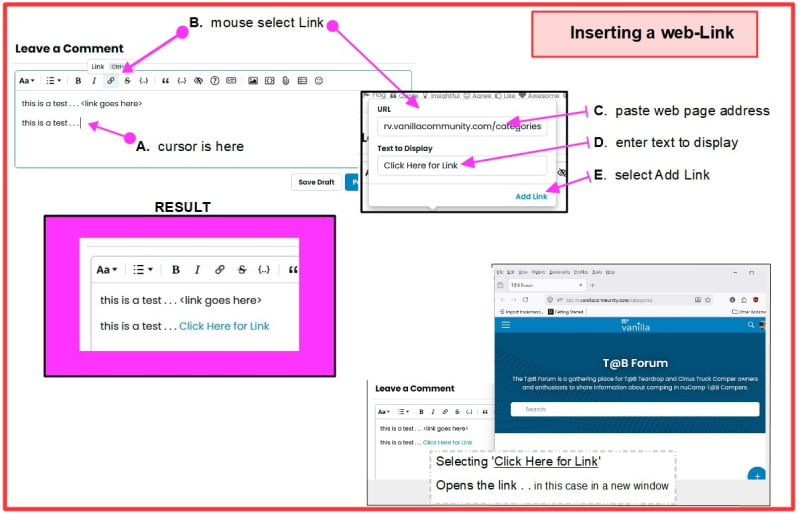
Courtesy of @MuttonChops , here is a useful diagram to show you how to create a hot link 🔗 n your post
 2019 T@B400 Boondock Lite "Todd"2016 Toyota Tundra 5.7 Crew Cab
 -
New format does not support HEIC photo uploads that MAC users sometimes have . The old version used to support this, now I can not upload photos any longer . HEIC is a pretty modern photo image format , surprised the new updated forum does not support it ? Just an FYI .
2023 Ford F150 Sport 3.5 Ecoboost
2024 NuCamp T@B 400 BD, Charcoal / White - 900AH LifePO4 , 620W Solar
2016 Ford Transit 350 XLT - Adventure / Travel Van / 320s interior !
2019 NuCamp T@B 320s Grey / Black - SOLD
-

This is an heic image that gave an error initially and now seems to have loaded, but only shows when on the mobile site
2019 T@B400 Boondock Lite "Todd"2016 Toyota Tundra 5.7 Crew Cab -
Update from Vanilla
Hi Quentin,
I wanted to let you know we’re actively looking into the HEIC image upload issue you reported after the theme update, and our team is working to confirm exactly what changed and what the best path forward will be. We know this is impacting your experience, and we’ll follow up with another update as soon as we have more information to share.Kind Regards,
Michael Heil
Senior Customer Support Specialist
Higher Logic Vanilla2019 T@B400 Boondock Lite "Todd"2016 Toyota Tundra 5.7 Crew Cab -
Still waiting for ideas on the text editor from Vanilla @MuttonChops
2019 T@B400 Boondock Lite "Todd"2016 Toyota Tundra 5.7 Crew Cab -
Here are the tests on the post below:
Hitting the quite button allows no edits, only a delete icon:
Hitting > and ENTER opens this so you can edit text:
Still waiting for ideas on the text editor from Vanilla
Here is the degree symbol °
Here is the umlaut symbol ü
Community Tip: How to Quote Single Sentences & Type Special Symbols (° & ü)
Hi Everyone,
We want to make sure our forum discussions stay clean, scannable, and efficient. Today we have a couple of quick "power-user" tips to help you highlight specific text in your replies and make typing technical answers even easier.
📊 How to Quote Just a Single Line or Question
When a member writes a long post, but you only want to reply to one specific line, hitting the main "Quote" button copies the entire post.
To isolate just the part you want to answer, use this quick trick:
- Highlight just the specific sentence or question you want to answer and copy it (
Ctrl + CorCmd + C). - Down in your reply box, type the
>symbol on a new line and press Space. - The editor will instantly create a blank, traditional Block Quote box.
- Paste your text inside it, hit Enter to drop below the box, and type your response!
Why do this? It keeps the forum cleaner and helps fellow members instantly see exactly what point you are responding to.
🔧 Quick Shortcuts for Degrees (°) and the nuCamp "ü"
Our text editor natively accepts any special characters your keyboard sends it. Here are the quickest shortcuts to type them directly from your keyboard instead of spelling them out:
The Degree Symbol (° )
- Windows: Hold down the Alt key and type 0176 on your keyboard's number pad.
- Mac: Press Option + Shift + 8 at the same time.
- Mobile/Tablet: Switch to your symbol keyboard and look for the ° bubble.
The nuCamp Umlaut (ü)
- Windows: Hold down the Alt key and type 0252 on your keyboard's number pad.
- Mac & Mobile: Simply press and hold the "U" key on your keyboard. A small menu will pop up allowing you to select the ü.
Happy formatting!
2019 T@B400 Boondock Lite "Todd"2016 Toyota Tundra 5.7 Crew Cab - Highlight just the specific sentence or question you want to answer and copy it (
-
@MuttonChops Concerning underlining text in a post, there are no realistic ways I could discover to change this in the text editor.
Suggestions are to consider Bold or Italics for the text you might have otherwise underlined, to make it more prominent.
Request : Adding Underline
The Verdict: Locked out by design choice, but natively bypassed by the keyboard.
- The Underline Tool: Vanilla deliberately excluded the underline button from their modern text formatter. In modern web standards, underlining text that isn't a clickable hyperlink is considered a major design flaw because it confuses readers trying to click on it. There is no admin toggle to force it back into the toolbar.
2019 T@B400 Boondock Lite "Todd"2016 Toyota Tundra 5.7 Crew Cab -
As an imperfect workaround for those who wish to underline text consider the quote symbol on the Rich text comment box above.

Community Tip: Using the Blockquote Tool to Highlight Text
Because underline formatting is not supported by the forum engine, members can use the Blockquote tool on the editor toolbar to emphasize text, isolate technical specifications, or separate official notes from general discussion.
Using a blockquote creates a distinct, indented box around your text, making it stand out on the page.
How to Use the Toolbar Blockquote Tool:
- Type or paste your text into the reply box.
- Highlight the specific sentences, measurements, or technical notes you want to emphasize.
- Click the Quote symbol (represented by quotation marks
“) on the editor toolbar.
Example of the Output:
Standard conversational text looks like this paragraph. When you apply the blockquote tool to technical specifications or critical steps, it displays like the box below:
Torque Specification: Tighten the wheel lugs to 90 ft-lbs in a star pattern. Recheck after the first 50 miles of travel.
When to Use This Method:
- To highlight safety warnings or mandatory steps.
- To separate manual text, instructions, or part numbers from your standard comment.
- To indicate a direct copy-and-paste from an external document or email.
2019 T@B400 Boondock Lite "Todd"2016 Toyota Tundra 5.7 Crew Cab -
On the mobile site the image looks like this:

This was the original question above:
New format does not support HEIC photo uploads that MAC users sometimes have . The old version used to support this, now I can not upload photos any longer . HEIC is a pretty modern photo image format , surprised the new updated forum does not support it ?
@B0atguy I found a plausible explanation for the HEIC issue. We added the HEIC image format to the forum "whitelist", so the image is accepted but it cannot be displayed unless on Mac or Iphone.
Here is the technical reason:
Subject: Technical explanation regarding HEIC image upload display issues
The forum platform accepts
.heicfile uploads because the format is explicitly permitted on our asset whitelist. However, the ability to view the image depends entirely on the web browser being used by the reader.Apple includes native HEIC decoding within iOS and macOS, which allows Safari users to view the files normally. Windows desktop browsers—including Google Chrome, Microsoft Edge, and Mozilla Firefox—lack the decoding architecture required to display HEIC files inside standard web templates.
Because the forum serves files exactly as they are uploaded without converting them to web-standard formats on the server side, PC users see a broken image icon.
Resolution:To ensure all members can view your photos, please save or convert your images to JPEG or PNG before uploading. You can set your iPhone to automatically save photos in a globally compatible format by going to Settings > Camera > Formats and checking Most Compatible.
This was elevated to tech support at Vanilla, so will see what they say.
UPDATE from Vanilla:
I’m going to pass your detailed write-up along to our product/engineering team as part of the ongoing ticket they’re already reviewing, so they can consider options like automatic conversion or clearer handling of HEIC uploads.
In the meantime, the most reliable workaround is still to convert photos to JPEG/PNG before uploading, or to set iPhones to “Most Compatible” so they save as JPEG going forward.Kind Regards,
Michael Heil
Senior Customer Support Specialist
Higher Logic Vanillaqhumberd
2019 T@B400 Boondock Lite "Todd"2016 Toyota Tundra 5.7 Crew Cab -
Why do this? It keeps the forum cleaner and helps fellow members instantly see exactly what point you are responding to.
OK. That worked, but sure would be nice if we could still edit within a normal quote window. Any logic as to why that feature was removed?
Now I just have to remember the greater than symbol / space work around. -
OK. That worked, but sure would be nice if we could still edit within a normal quote window. Any logic as to why that feature was removed?
Here is the technical explanation I got:
Still need to verify this…
Technical Reasons for Quote Limitation in Vanilla Rich EditorThe inability to highlight part of a post and directly convert it into a partial quote stems from two architectural choices in the HigherLogic Vanilla software: immutable block nodes and editor selection boundaries.
1. Immutable "Rich Quote" Blocks
When you click the default "Quote" button under a post, the platform does not copy plain text into the editor. Instead, it generates a specific structural data type called an Atomic Block Node inside the editor's React framework (Slate/Plate).
- The Mechanism: To preserve accurate tracking data (the original author's identity, the precise timestamp, and the database link back to the source post), the software locks this node.
- The Result: The editor treats the entire quote container as a single, indivisible object—identical to how it handles an attached image file or an embedded YouTube video. Because it is a locked object, the cursor cannot edit, select, or delete text strings within it; it can only select and delete the entire container.
2. Isolation of Clipboard Selection Boundaries
When a user highlights text from a prior post on the screen and uses standard copy-and-paste (Ctrl+C / Ctrl+V), the process fails to create a quote box due to how browser memory interacts with the text editor.
- The Mechanism: Highlighting text on a webpage wrapper occurs outside the boundary of the active text editor program. The operating system clipboard only copies the raw text characters, stripping away the forum's structural identity data.
- The Result: When pasted into the editor window, the software reads it as standard, unformatted text characters and places it inside a normal paragraph block. The editor cannot automatically assume the text came from a previous forum post versus an external website, so it does not format it as a quote.
3. Absence of a Global Selection Listener
Some web platforms feature a "Quote Selection" option, where highlighting text anywhere on the page triggers a pop-up button to quote only that text.
- The Status in Vanilla: For this to work, the forum software must run an active script across the entire webpage wrapper that constantly monitors mouse selections, captures the exact text fragment, maps it to the author data of that specific post container, and injects a custom blockquote node into the editor. HigherLogic Vanilla's modern editor does not contain this global selection listener framework.
2019 T@B400 Boondock Lite "Todd"2016 Toyota Tundra 5.7 Crew Cab -
Here is a new help guide and explanation
2019 T@B400 Boondock Lite "Todd"2016 Toyota Tundra 5.7 Crew Cab
Categories
- All Categories
- 10 Cirrus Truck Campers
- 118 Dutchman and Vintage TaB Archives
- 3 Forum Rules
- 3 nüCamp & Forum Contacts
- 952 Air Conditioning & Refrigeration
- 2.6K Battery/Electrical & Solar
- 1.2K Camping & Travel
- 142 Events & News
- 219 Factory Comments
- 19 "FOR SALE" - New/Used Trailers
- 12 “FOR SALE" - Camping & Trailer Gear
- 2.4K Heating/Plumbing & Winterizing
- 140 Help - Computer & System
- 919 Introductions
- 407 Looking to purchase a trailer?
- 2.1K Modifications & Upgrades
- 1.4K Products and Accessories
- 406 Service/Maintenance & Recall Notices
- 37 Solo Travelers Hints & Tips
- 1 T@G Forum
- 74 Teardrop Groups & Links
- 77 Testimonials
- 914 Tips & Tricks
- 1.5K Trailer & Towing
- 27 Owners Manuals/PDF Files/Videos & Resources
- 62 üCamp Rally - News & Information