new format = = What's With the Text Editor

 }}
}}'18 320 S, pitched axle, 3020HE; PNW based
TV: '17 Colorado V6 Z71 4x4, Tow Package, GM Brake Controller
TV: '25 Canyon AT4
Adventures: 50 Nights: 415 Towing Miles 50,650
Comments
-
So with Firefox there is an issue, and not really a good solution from what I was told. I don't have a better solution right now but I will ask my Vanilla contact for some updated advice.MuttonChops said:Has anyone figured out how the new format text editor is working? . . .In the old-days, one could use the </> function to control line-feeds and while that option/function is available it does not seem to function the same on my Win11+Firefox PC.Before the change; the html command '</div>' created an ~1.5 to 2 linefeedsUsers could control by using the <br> command that was only one linefeedIn this 'new format' environment it seems:. . . <br> . . . now creates 1.5 to 2 linefeedsVery Confusing - - - - So has anyone found hte Secert Code for what is happening.{{ as a control type-person I find big breaks of white lines madding }}
So, as some wise person once told me, "Endeavor to Persevere".
I'll let everyone know what they say2019 T@B 400 Boondock Lite towed by 2016 5.7L Toyota Tundra
0 -
@MuttonChops Here is the suggestion for preventing double spacing in Firefox browers, and I will also post the link to how to use the Rich Text Editor they provided
Thanks for your question. They could use:
Enter = paragraph break
Shift+Enter = line breakYou can also recommend that they use Code Blocks or Markdown macros for their posts. You can review everything regarding how to use Rich Editor here.
2019 T@B 400 Boondock Lite towed by 2016 5.7L Toyota Tundra
1 -
@MuttonChops Here the link to how to use the Rich Text Editor they provided
https://success.vanillaforums.com/kb/articles/615-rich-editor?utm_source=community-search&utm_medium=organic-search&utm_term=rich+editor
Within this is are the Code Blocks and Markdown Macros stuff.
if you can make it explainable and simple for others, and if it works for you, please post and we will share.
Thanks2019 T@B 400 Boondock Lite towed by 2016 5.7L Toyota Tundra
0 -
I'll play with the 'enter' and shift+enter and see if that helps.qhumberd said:
@MuttonChops Here is the suggestion for preventing double spacing in Firefox browers, and I will also post the link to how to use the Rich Text Editor they providedThanks for your question. They could use:
Enter = paragraph break
Shift+Enter = line breakYou can also recommend that they use Code Blocks or Markdown macros for their posts. You can review everything regarding how to use Rich Editor here.
As for Rich Text Editor . . . for now I'll stay with the older {current} editor.
Also, am not sure a single user can change the editor - - I've not been able to locate the referenced "Setting" Page. It might be super-user-only.
'18 320 S, pitched axle, 3020HE; PNW based
TV: '17 Colorado V6 Z71 4x4, Tow Package, GM Brake Controller
TV: '25 Canyon AT4
Adventures: 50 Nights: 415 Towing Miles 50,6500 -
A bit more on the Text Format.Vanilla Forum has always displayed a bit weird on the FireFox Browser. Prior to the recent 'New' Format change the extra linefeeds could be edited out using the " </> " feature {not available with the Rich Text Editor, btw}.
It appears that is no longer possible in the 'New' Format update. This image shows the difference in how the text is displayed between Browsers: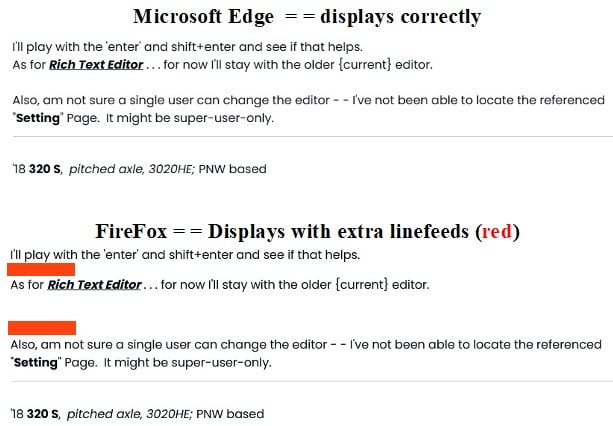 I read/use several different Forums. Only this one Vanilla Based Forum does not display correctly on the FireFox Browser.
'18 320 S, pitched axle, 3020HE; PNW based
TV: '17 Colorado V6 Z71 4x4, Tow Package, GM Brake Controller
TV: '25 Canyon AT4
Adventures: 50 Nights: 415 Towing Miles 50,6500 -
please try again as I found the settings and switched the default editor to Rich on desktop and mobile. Previously it was wysiwyg for both.Let me know if it helps
Quentin2019 T@B 400 Boondock Lite towed by 2016 5.7L Toyota Tundra
0 -
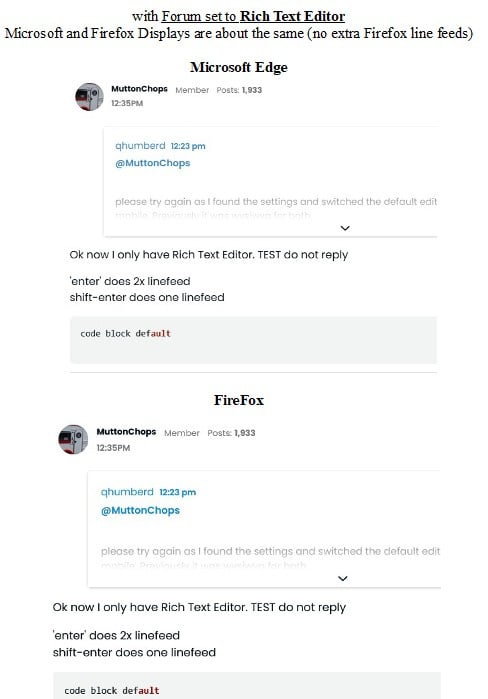
Ok now I only have Rich Text Editor. TEST do not reply
'enter' does 2x linefeed
shift-enter does one linefeedcode block default
'18 320 S, pitched axle, 3020HE; PNW based
TV: '17 Colorado V6 Z71 4x4, Tow Package, GM Brake Controller
TV: '25 Canyon AT4
Adventures: 50 Nights: 415 Towing Miles 50,6500 -
@qhumberd
Well the Rich Text Editor does resolve/fix the FireFox line feed display issue
I for one Do Not Like the limitations of the Rich Text Editor.
For myself I'd prefer to deal with FireFox display bug instead of using the more limited and more confusing Rich Text Editor. [for example Rich Text does not appear to allow changing quoted section of a message - - an older feature that is helpful when responding to single questions hidden in long original posts ]That however is a Forum Community or Forum Admin decision as the editor. . .
older 'Advanced' or newer 'Rich Text' must be (I believe) set for all forum users.
Side Note: 'Advanced' is the historical editor we have used for years.Edge vs. Firefox Display using Rich Text editior:
'18 320 S, pitched axle, 3020HE; PNW based
TV: '17 Colorado V6 Z71 4x4, Tow Package, GM Brake Controller
TV: '25 Canyon AT4
Adventures: 50 Nights: 415 Towing Miles 50,6500 -
Thanks for your thoughtful response and investigation. As I am the newest moderator, I am going to pass the decision to leave the Rich editor on or change it to something else on to our administrators @ScottG and @pthomas745. You are right that the Settings makes you pick an editor option for all members.
But at least one thing got figured out.
qhumberd
2019 T@B 400 Boondock Lite towed by 2016 5.7L Toyota Tundra
1 -
This discussion was created from comments split from: new format == Location of Mark All Read command ?.0
-
This discussion was created from comments split from: new format == Location of Mark All Read command ?.0


Categories
- All Categories
- 12 Cirrus Truck Campers
- 128 Dutchman and Vintage TaB Archives
- 3 Forum Rules
- 3 nüCamp & Forum Contacts
- 970 Air Conditioning & Refrigeration
- 2.7K Battery/Electrical & Solar
- 1.2K Camping & Travel
- 145 Events & News
- 220 Factory Comments
- 28 "FOR SALE" - New/Used Trailers
- 16 “FOR SALE" - Camping & Trailer Gear
- 2.4K Heating/Plumbing & Winterizing
- 138 Help - Computer & System
- 925 Introductions
- 409 Looking to purchase a trailer?
- 2.2K Modifications & Upgrades
- 1.4K Products and Accessories
- 427 Service/Maintenance & Recall Notices
- 37 Solo Travelers Hints & Tips
- 1 T@G Forum
- 78 Teardrop Groups & Links
- 78 Testimonials
- 922 Tips & Tricks
- 1.5K Trailer & Towing
- 27 Owners Manuals/PDF Files/Videos & Resources
- 56 üCamp Rally - News & Information